
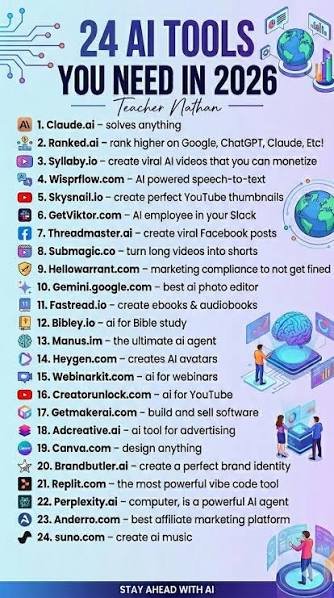
Artificial intelligence has become one of the most useful technologies for work, study, business, and creativity. In 2026, AI tools can help users write content, research topics, create images and videos, analyze information, write code, manage tasks, and automate repetitive work.
Whether you are a student, freelancer, content creator, developer, marketer, or business owner, the right AI apps can help you save time and get more done.
In this guide, we have listed 25 AI tools you should try in 2026 to improve productivity and make everyday tasks easier.
What Are AI Tools?
AI tools are software applications that use artificial intelligence to perform or assist with tasks that normally require human effort. Depending on the platform, they can generate text, create images, summarize documents, analyze data, translate languages, write code, or automate workflows.
The biggest advantage of AI tools is that they can reduce repetitive work and give you more time to focus on important tasks.
25 AI Tools You Need to Try in 2026
1. ChatGPT
ChatGPT is a versatile AI assistant that can help with writing, brainstorming, learning, coding, research, summarization, and everyday tasks.
You can use it to create outlines, explain difficult topics, improve your writing, generate ideas, and organize projects.
Best for: Writing, learning, brainstorming, coding, productivity.
2. Google Gemini
Google Gemini is an AI assistant designed for research, writing, planning, analysis, and productivity. It can be particularly useful for people who already use Google’s ecosystem.
Gemini can help summarize information, generate ideas, answer questions, and assist with various everyday tasks.
Best for: Research, productivity, writing, and Google users.
3. Claude
Claude is an AI assistant that can help users write, analyze documents, summarize information, brainstorm ideas, and solve complex problems.
It is especially useful when working with lengthy text or documents.
Best for: Writing, analysis, research, and documents.
4. Microsoft Copilot
Microsoft Copilot brings AI assistance into Microsoft’s productivity ecosystem. It can help users draft content, summarize information, generate ideas, and complete workplace tasks.
For people who regularly use Microsoft products, Copilot can be a useful productivity companion.
Best for: Work, business, Microsoft users, and productivity.
5. Perplexity
Perplexity is an AI-powered search and research platform that helps users find information through conversational queries.
Instead of simply providing a list of search results, it is designed to provide direct answers and supporting sources.
Best for: Research, fact-finding, and current information.
6. Midjourney
Midjourney is an AI image-generation platform that allows users to create visual content from text prompts.
It can be useful for creative concepts, illustrations, visual inspiration, and digital artwork.
Best for: AI art, image generation, and creative projects.
7. Canva AI
Canva combines graphic-design tools with AI features to help users create presentations, social media graphics, posters, documents, and other visual content.
Its simple interface makes it suitable for beginners as well as experienced creators.
Best for: Graphic design, presentations, marketing, and social media.
8. Adobe Firefly
Adobe Firefly provides generative AI capabilities for creative work. It can help users generate and modify visual content as part of creative workflows.
Designers and content creators can use AI features to explore ideas and speed up certain design tasks.
Best for: Design, image generation, and creative work.
9. Grammarly
Grammarly is an AI-powered writing assistant that can help improve grammar, spelling, clarity, tone, and overall communication.
It is useful for emails, articles, schoolwork, business documents, and everyday writing.
Best for: Writing, editing, students, and professionals.
10. Jasper
Jasper is focused on AI-powered content creation and marketing. It can help teams generate marketing copy, campaign ideas, blog content, and other business materials.
It can be especially useful for marketers who need to produce content regularly.
Best for: Marketing, content creation, and businesses.
11. Copy.ai
Copy.ai provides AI-powered tools for marketing and business workflows. It can help create drafts for sales, marketing, and communication tasks.
The platform is designed to reduce repetitive content work and help teams move faster.
Best for: Marketing, sales, and business content.
12. GitHub Copilot
GitHub Copilot is an AI coding assistant that helps developers write and understand code.
It can suggest code, generate functions, explain programming concepts, and assist with development tasks.
Best for: Developers, programmers, and software projects.
13. Cursor
Cursor is an AI-powered code editor designed to help developers work more efficiently.
It can assist with understanding codebases, generating code, making changes, and debugging software.
Best for: Coding, software development, and debugging.
14. Notion AI
Notion AI adds artificial intelligence features to the Notion workspace. It can help users summarize notes, generate ideas, organize information, and work with documents.
For students and professionals who already use Notion, it can make knowledge management more efficient.
Best for: Notes, project management, organization, and productivity.
15. NotebookLM
NotebookLM is an AI research and learning assistant designed to work with provided sources and documents.
It can help users understand lengthy material, summarize information, organize research, and study more efficiently.
Best for: Students, research, studying, and documents.
16. Otter.ai
Otter.ai provides AI-powered transcription and meeting assistance.
It can turn conversations and meetings into searchable text, making it easier to review discussions and identify important information.
Best for: Meetings, transcription, interviews, and notes.
17. ElevenLabs
ElevenLabs focuses on AI voice and audio technology. It can be used for voiceovers, narration, and other audio-content workflows.
Content creators can use AI-generated voices to produce narration for different types of projects.
Best for: Voiceovers, narration, and audio content.
18. Runway
Runway provides AI-powered tools for video generation and creative editing.
It can help creators experiment with AI video, visual effects, and other forms of digital storytelling.
Best for: Video creation, filmmaking, and creative projects.
19. Descript
Descript provides an AI-assisted approach to audio and video editing. Its text-based workflow can make editing podcasts and videos easier.
Creators can work with transcripts and use AI features to streamline parts of the editing process.
Best for: Podcasts, video editing, and content creation.
20. Zapier
Zapier is a popular automation platform that connects different applications and services.
Its automation capabilities can help users reduce repetitive tasks, such as moving information between apps or triggering actions based on specific events.
Best for: Automation, business workflows, and productivity.
21. DeepL
DeepL is an AI-powered translation platform that helps users translate text between languages.
It can be useful for students, businesses, writers, and anyone who regularly works with multilingual content.
Best for: Translation, communication, and international work.
22. Synthesia
Synthesia is an AI video platform that allows users to create videos with AI-generated presenters.
It can be useful for training materials, educational videos, presentations, and business communication.
Best for: Training, education, presentations, and business videos.
23. Hugging Face
Hugging Face provides an extensive ecosystem of AI models, datasets, and development tools.
It is particularly useful for developers and researchers who want to experiment with machine learning and artificial intelligence technologies.
Best for: AI development, machine learning, and research.
24. DeepSeek
DeepSeek has attracted attention for its AI models and capabilities in areas such as reasoning, mathematics, and coding.
It can be useful for technical users who want another AI option for problem-solving and programming tasks.
Best for: Coding, reasoning, mathematics, and technical work.
25. Google AI Studio
Google AI Studio provides a development environment for experimenting with Google’s generative AI models and building AI-powered applications.
It can be useful for developers who want to test AI capabilities and create applications around generative AI.
Best for: Developers, AI experimentation, and application development.
How AI Tools Can Help You Get More Done
AI tools can improve productivity in several different ways.
Save Time
AI can handle repetitive tasks such as summarizing text, drafting content, organizing information, and transcribing meetings.
Improve Writing
AI writing assistants can help users brainstorm ideas, improve clarity, correct mistakes, and create initial drafts.
Make Research Easier
AI research tools can help organize information and provide quick summaries, making it easier to understand large amounts of material.
Boost Creativity
Image, video, audio, and writing tools can help creators turn ideas into content more quickly.
Help With Coding
AI coding assistants can generate code suggestions, explain programming concepts, and help developers identify potential problems.
Automate Repetitive Work
Automation platforms can connect different applications and reduce the amount of manual work required for routine processes.
How to Choose the Right AI Tool
You don’t need to use all 25 AI tools. The best approach is to choose tools based on your specific needs.
For writing: ChatGPT, Claude, Grammarly, Jasper
For research: Perplexity, NotebookLM, Gemini
For design: Canva AI, Adobe Firefly, Midjourney
For coding: GitHub Copilot, Cursor, Google AI Studio, DeepSeek
For video: Runway, Descript, Synthesia
For productivity: Notion AI, Microsoft Copilot, Zapier
For translation: DeepL
For audio: ElevenLabs, Otter.ai
Tips for Using AI Tools Effectively
AI tools work best when you use them as assistants rather than relying on them blindly.
- Give clear instructions — Specific prompts usually produce more useful results.
- Review AI-generated information — Always check important facts and details.
- Protect private information — Avoid entering sensitive personal or confidential information into tools unless you understand their privacy practices.
- Choose the right tool — Different AI platforms are designed for different tasks.
- Combine AI with human judgment — AI can speed up your workflow, but human review remains important.
Final Thoughts
AI is becoming an increasingly important part of modern productivity. The 25 AI tools in this guide cover writing, research, design, coding, video, audio, automation, translation, and business workflows.
You don’t need dozens of subscriptions to benefit from AI. Start with one or two tools that match your goals, learn how to use them effectively, and gradually build a workflow that helps you save time, work smarter, and get more done in 2026.
As AI technology continues to develop, new tools and features will appear throughout the year. Keeping your toolkit focused on practical solutions can help you take advantage of AI without making your workflow unnecessarily complicated.