
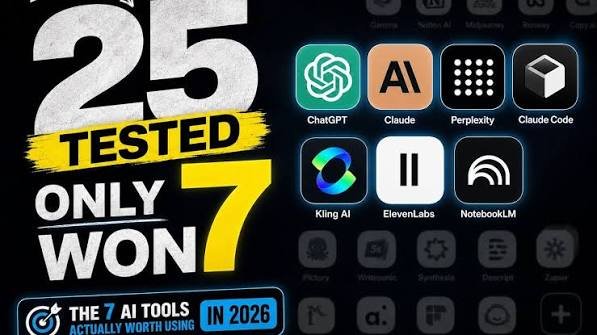
I spent three months testing 25 AI tools. Not installing them for a day and calling it a review — actually using them for real work, every week, until I either stopped opening them or couldn’t work without them.
Eighteen got cut. Not because they’re bad. Most of them are genuinely clever. But clever isn’t the same as useful, and “useful” is the only thing that survives contact with a busy week.
Here are the 7 that survived.
The Short Version
| # | Tool | Job It Does | Verdict |
|---|---|---|---|
| 1 | ChatGPT | General thinking partner | Still the default |
| 2 | Claude | Long documents + writing | Better for long context |
| 3 | Perplexity | Research with sources | Replaced my Googling |
| 4 | ElevenLabs | Voiceover | Broadcast-quality audio |
| 5 | Descript | Video/audio editing by text | Cut my edit time in half |
| 6 | NotebookLM | Working with your own documents | Best free tool on this list |
| 7 | Cursor / AI code editors | Writing code | Only if you code |
Now the details — including why each one made it and who should skip it.
1. ChatGPT — The One You Already Have Open
There’s a reason this is first even though everyone knows it. Most people are using about 15% of what it can do, and the 85% they’re ignoring is where the value lives.
What changed my workflow: uploading files and asking it to work on them instead of asking it general questions. Summarize this contract. Turn this spreadsheet into a table. Rewrite this paragraph without the buzzwords.
Who should skip it: nobody. Even if you use something else as your main tool, this is the one you test everything against.
Reality check: the free tier is enough for a lot of people. Pay for it only once you hit the limits regularly.
2. Claude — For Long Documents and Actual Writing
The difference shows up the moment you paste in something big. Long reports, full transcripts, 40-page PDFs — this is where it holds together better than most.
What changed my workflow: feeding it full transcripts and asking for structural rewrites, not just grammar fixes. The output sounds less like a press release.
Who should skip it: if your tasks are short and quick, you won’t feel the difference. This one earns its place on long, complex work.
3. Perplexity — Research That Shows Its Sources
Normal AI search gives you an answer and you have to trust it. This gives you an answer with links, so you can check. That one difference changes how you use it.
What changed my workflow: anything I’d previously open 12 browser tabs for now takes one query — and I can click through to verify.
Who should skip it: if you never do research, you don’t need it. But most creators research constantly, even when they don’t call it that.
4. ElevenLabs — Voiceover You Won’t Cringe At
Old AI voices sounded like a GPS having a bad day. This is the first one where I stopped noticing it wasn’t a person.
What changed my workflow: drafts get a rough voiceover in minutes. I can hear where a script drags before I record it properly.
Who should skip it: if you’re on camera and never use voiceover, you have no use for this.
⚠️ One caution: if you clone a voice, do it with permission and follow the platform’s rules. Voice cloning misuse is a fast way to get a channel demonetized.
5. Descript — Edit Video Like It’s a Text Document
Delete a word in the transcript, and it’s deleted from the video. That’s the whole pitch, and it’s as good as it sounds.
What changed my workflow: removing filler words (“um”, “so”, “basically”) went from a 40-minute timeline session to a 3-minute cleanup. My pacing got tighter as a side effect.
Who should skip it: if you’re already fast in your editor, the switch cost may not be worth it.
6. NotebookLM — The Best Free Tool on This List
Upload your own sources — PDFs, docs, notes — and it answers only from those, with citations pointing back to the passage. No hallucinated facts, because it’s not allowed to leave your material.
What changed my workflow: research dumps stop being a graveyard. I feed in sources during research and query my own pile instead of re-reading it.
Who should skip it: if you don’t work from documents, there’s nothing to feed it.
7. Cursor / AI Code Editors — Only If You Write Code
I’ll be direct: most “AI tool” lists include a coding tool to look technical. That’s a bad reason. Include this one only if you actually write code.
What changed my workflow: editing by describing the change instead of hunting through files.
Who should skip it: every non-coder. If you don’t code, this slot should go to something you’ll open weekly — a scheduling tool, a spreadsheet assistant, anything.
The 18 I Stopped Using
I’m not going to trash them. But here’s the pattern behind almost every cut:
- They did one thing I could already do. A dedicated “AI email writer” when the tool I already had does it — one more subscription, same result.
- The learning curve never paid off. If it takes longer to set up than to do manually, it doesn’t matter how capable it is.
- They were demos, not tools. Impressive in a promo video, useless on a Tuesday.
- The free tier was the whole product. Upgrade prompts everywhere, output too limited to actually use.
The filter I now use before adopting anything new: Will I open this at least three times next week for real work? If the honest answer is “probably not,” it doesn’t matter how good the demo was.
How I Tested
Same three criteria for all 25:
- Real work only — no test projects. If it didn’t touch actual output, it didn’t count.
- Two weeks minimum — the novelty has to wear off first, or you’re rating the excitement, not the tool.
- Would I pay at full price? Free tools get a pass they haven’t earned.
FAQ
Do I need all 7? No. Start with one or two. A tool you use daily beats seven you open once. Most people get 80% of the value from the first three on this list.
Are the free versions enough? For several of these, yes — especially if your usage is light. Pay when you hit limits regularly, not in advance.
What’s the best one for a beginner? Whatever one you’ll actually open tomorrow.
📊 SEO Notes (article ke liye, publish se pehle)
- Target keyword: 64 best ai tools 2026 — 72,070 monthly searches, competition 48.8. Ye tera primary target hai, aur 66 ai tools (866,701 searches) se kaafi zyada achievable hai kyunki uska competition 68 hai.
- Secondary: 71 free ai tools — 229,567 searches, competition 41.3. Isko intro aur FAQ mein natural rakh, aur ek dedicated “free tier” line bhi — 41% se zyada searches India se aati hain.
- Meta title idea: Best AI Tools 2026: I Tested 25, Only 7 Are Worth It
- Meta description idea: I tested 25 AI tools for 2026. 18 got cut. Here are the 7 that survived — what each does, who should skip it, and why.
- Internal link: tera video isi article ke saath embed kar — article se video views aate hain, aur video description se article pe backlink.
Chahe to isi ka video script bana doon (7 tools ko beats mein tod kar), ya thumbnail generate kar doon? 🎯