
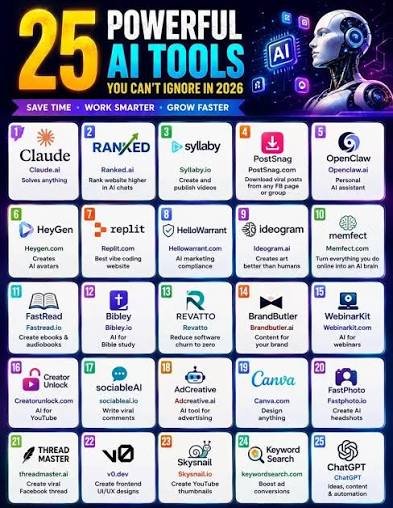
Artificial intelligence is changing the way we work, study, create content, and manage everyday tasks. In 2026, AI tools are more powerful and accessible than ever, with new applications appearing across almost every industry.
Whether you are a student looking for help with research, a blogger creating content, a developer writing code, or a business owner trying to automate repetitive tasks, there is an AI tool that can make your workflow easier.
But with hundreds of AI apps available, choosing the right ones can be difficult.
To help you get started, here are 25 amazing AI tools in 2026 that are worth checking out.
1. ChatGPT — Best All-Purpose AI Assistant

ChatGPT is one of the most versatile AI tools available. It can help you write content, brainstorm ideas, explain complex topics, analyze information, generate code, summarize documents, and much more.
Its flexibility makes it useful for both beginners and experienced users.
Best for: Writing, research, brainstorming, coding, productivity, and everyday questions.
2. Claude — Great for Writing and Analysis
Claude is an AI assistant known for strong writing and analytical capabilities.
It can help with long-form content, document analysis, brainstorming, coding, summarization, and professional communication.
Best for: Writers, researchers, students, and developers.
3. Google Gemini — AI for Google Users
Google Gemini is a powerful AI assistant that works particularly well for people who use Google’s ecosystem.
It can help with research, writing, brainstorming, productivity, and various multimodal tasks.
Best for: Students, professionals, researchers, and Google Workspace users.
4. Perplexity — AI-Powered Research

Perplexity is designed for finding and understanding information online.
Instead of simply providing a traditional list of search results, it can generate an answer and provide sources that you can review.
Best for: Research, fact-checking, students, bloggers, and professionals.
5. Microsoft Copilot — Productivity Assistant
Microsoft Copilot brings AI assistance into Microsoft’s ecosystem.
It can help users with writing, brainstorming, summarization, information retrieval, and productivity-related tasks.
Best for: Microsoft 365 users and business professionals.
6. Cursor — AI Coding Assistant
Cursor is designed specifically for software development.
It can help programmers understand existing code, generate new code, make edits, find bugs, and work through programming tasks more efficiently.
Best for: Developers and programming students.
7. GitHub Copilot — Coding with AI
GitHub Copilot helps developers write code with AI-powered suggestions.
It can reduce the amount of repetitive coding and help programmers explore possible solutions while working inside supported development environments.
Best for: Software developers and engineering teams.
8. Canva AI — Easy Design Creation
Canva is one of the easiest design platforms for beginners, and its AI-powered features make content creation even faster.
You can use it to create social media posts, presentations, thumbnails, posters, marketing graphics, and more.
Best for: Bloggers, students, marketers, creators, and small businesses.
9. Midjourney — AI Image Generation
Midjourney is popular among users who want to create artistic and creative images using text prompts.
It can be useful for illustrations, concepts, creative projects, marketing ideas, and visual experimentation.
Best for: Artists, designers, content creators, and marketers.
10. Adobe Firefly — AI for Creative Work
Adobe Firefly provides generative AI capabilities for creative workflows.
It can help users create and modify visual content while fitting naturally into Adobe’s broader creative ecosystem.
Best for: Designers, photographers, and creative professionals.
11. Gamma — Create Presentations with AI
Gamma can help users create presentations and visual documents with AI.
Instead of starting with a blank slide deck, you can provide a topic and let AI help structure the initial presentation.
Best for: Students, teachers, marketers, and business professionals.
12. Notion AI — Smart Workspace
Notion combines notes, documents, databases, and project organization with AI features.
You can use AI to summarize information, generate drafts, organize ideas, and improve productivity.
Best for: Students, teams, project managers, and knowledge workers.
13. Grammarly — Improve Your Writing
Grammarly helps users improve their writing by identifying grammar, spelling, clarity, and style issues.
Its AI-powered features can also assist with rewriting and adjusting the tone of content.
Best for: Students, writers, bloggers, and professionals.
14. NotebookLM — Research Your Documents
NotebookLM is particularly useful when you have documents or sources that you want AI to analyze.
It can help summarize information, answer questions about your sources, and make large amounts of material easier to understand.
Best for: Students, researchers, writers, and professionals.
15. Jasper — AI for Marketing
Jasper focuses heavily on marketing and business content.
It can assist with creating content ideas, marketing copy, campaign material, and other forms of business communication.
Best for: Marketers, agencies, and businesses.
16. Zapier AI — Automate Repetitive Work
Zapier is well known for connecting different applications and automating workflows.
Its AI features can make automation easier by helping users build workflows and handle repetitive tasks.
Best for: Businesses, marketers, freelancers, and productivity enthusiasts.
17. ClickUp AI — AI Project Management
ClickUp combines task management, project organization, collaboration, and AI-powered productivity features.
Teams can use it to organize work, summarize information, create content, and manage projects.
Best for: Teams, project managers, and businesses.
18. Fireflies.ai — AI Meeting Assistant
Meetings often generate a lot of information that can be difficult to remember.
Fireflies.ai can help capture meeting conversations, create transcripts, and summarize important points and action items.
Best for: Remote teams, managers, sales teams, and professionals.
19. ElevenLabs — AI Voice Generation
ElevenLabs focuses on AI-powered speech and voice generation.
It can be useful for narration, voiceovers, educational projects, and other audio-content workflows.
Best for: Video creators, podcasters, educators, and content producers.
20. Runway — AI Video Creation
Runway provides AI-powered tools for video generation and editing.
As AI video technology continues to develop, platforms like Runway are becoming useful for creators who want to experiment with new video-production workflows.
Best for: Video creators, filmmakers, marketers, and designers.
21. Descript — AI Video and Audio Editing
Descript makes editing audio and video more accessible by combining media editing with transcription.
Its text-based approach can make it easier to edit spoken content without manually working through every part of a traditional timeline.
Best for: YouTubers, podcasters, educators, and content creators.
22. Otter.ai — AI Transcription
Otter.ai can convert spoken conversations into text.
This can be particularly useful for meetings, interviews, lectures, and discussions where manually taking notes would be time-consuming.
Best for: Students, professionals, journalists, and meeting-heavy teams.
23. Synthesia — Create AI Presenter Videos
Synthesia allows users to create videos featuring AI-generated presenters.
It can be useful for training videos, educational content, internal communications, and business presentations.
Best for: Businesses, educators, trainers, and marketers.
24. QuillBot — AI Writing Assistant
QuillBot can help users rewrite and paraphrase text while maintaining the original meaning.
It can be useful when you want to improve the wording of content or explore alternative ways to express an idea.
Best for: Students, writers, bloggers, and content creators.
25. Figma AI — AI for UI/UX Design
Figma is widely used for interface and product design.
Its AI-powered capabilities can help designers and product teams speed up parts of their creative and design workflow.
Best for: UI/UX designers, product teams, and developers.
How to Choose the Best AI Tool
You don’t need to use all 25 tools.
The right AI tool depends on what you want to accomplish.
For Writing
Consider:
- ChatGPT
- Claude
- Grammarly
- QuillBot
- Jasper
For Research
Consider:
- Perplexity
- Gemini
- NotebookLM
- ChatGPT
For Coding
Consider:
- Cursor
- GitHub Copilot
- ChatGPT
- Claude
For Design
Consider:
- Canva AI
- Midjourney
- Adobe Firefly
- Figma AI
For Video
Consider:
- Runway
- Descript
- Synthesia
For Productivity
Consider:
- Notion AI
- ClickUp AI
- Zapier AI
- Fireflies.ai
Do You Really Need 25 AI Tools?
Probably not.
One of the biggest mistakes people make is trying to use every new AI application they discover.
Many tools have overlapping features. Several can write content, summarize information, generate ideas, or answer questions.
Instead of collecting dozens of AI apps, start with two or three tools that match your needs.
For example, a simple setup could be:
ChatGPT + Perplexity + Canva AI
This combination can cover general AI assistance, research, and visual content creation.
Developers could add Cursor or GitHub Copilot, while video creators might benefit from Runway or Descript.
Free vs. Paid AI Tools
Many AI tools offer free plans with limitations, while advanced features may require a subscription.
Before paying for an AI service, try to determine whether it provides enough value for your specific workflow.
Ask yourself:
- Does this tool save me time?
- Will I use it regularly?
- Does it offer something I cannot easily get elsewhere?
- Are the premium features actually useful to me?
If you only need an AI tool occasionally, the free version may be enough.
Benefits of Using AI Tools in 2026
AI tools can provide several practical benefits:
Save Time
AI can handle repetitive tasks and help you complete work faster.
Improve Productivity
Instead of spending hours on routine work, you can focus on higher-value tasks.
Generate Ideas
AI can help brainstorm topics, headlines, designs, business ideas, and content concepts.
Learn Faster
Students and professionals can use AI to explain complicated concepts in simpler language.
Create More Content
Writers, designers, video creators, and marketers can use AI to speed up parts of their creative workflows.
Final Thoughts
The AI revolution is no longer something happening in the distant future. AI tools are already changing the way people work, study, create, and communicate in 2026.
From ChatGPT and Claude for general-purpose assistance to Perplexity for research, Cursor for coding, Canva AI for design, and Runway for video, there are more options than ever.
However, you don’t need every AI tool available.
The smartest approach is to identify your biggest challenges and choose tools that solve those specific problems.
Start with a few useful AI apps, learn how to use them effectively, and expand your toolkit as your needs grow.
The right AI tools won’t replace your creativity—they can help you turn your ideas into results faster.