
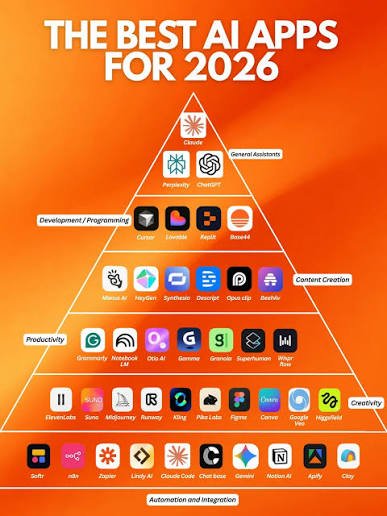
Artificial intelligence is changing the way people work, study, create content, communicate, and manage everyday tasks. In 2026, AI tools have become more powerful, accessible, and useful than ever before.
From AI writing assistants and image generators to research platforms, coding tools, productivity apps, and video creators, there is an AI solution for almost every type of task.
In this guide, we explore 25 of the best AI tools in 2026 that can help you save time, improve productivity, generate better ideas, and accomplish more with less effort.
What Are AI Tools?
AI tools are software applications that use artificial intelligence to perform tasks that traditionally require human effort. These tasks can include writing, research, data analysis, coding, image generation, video creation, transcription, translation, and more.
The best AI apps can automate repetitive work while helping users focus on creativity, decision-making, and important projects.
25 Best AI Tools in 2026
1. ChatGPT — AI Assistant for Almost Everything
ChatGPT is one of the most versatile AI tools available. It can help with writing, brainstorming, learning, coding, summarizing information, planning projects, and answering questions.
Best for: Writing, learning, brainstorming, coding, productivity
2. Google Gemini — AI for Work and Research
Google Gemini is an AI assistant designed to help users with research, writing, planning, analysis, and everyday questions. Its integration with Google’s ecosystem makes it particularly useful for people already using Google services.
Best for: Research, productivity, writing, Google users
3. Claude — AI for Writing and Analysis
Claude is an AI assistant known for handling long documents and detailed writing tasks. It can help users summarize content, analyze information, brainstorm ideas, and create polished text.
Best for: Writing, document analysis, research
4. Microsoft Copilot — AI for Microsoft Users
Microsoft Copilot brings AI capabilities into Microsoft’s productivity ecosystem. It can assist with writing, research, summarization, brainstorming, and various workplace tasks.
Best for: Office users, productivity, business
5. Perplexity — AI Search and Research
Perplexity combines conversational AI with web-based search to help users research topics and find information quickly. It can be useful when you want an answer accompanied by sources.
Best for: Research, fact-finding, current information
6. Midjourney — AI Image Generation
Midjourney is a popular AI image-generation platform for creating creative and visually detailed images from text prompts.
It can be useful for concept art, visual ideas, creative projects, and design inspiration.
Best for: AI art, creative images, concept design
7. Canva AI — AI-Powered Design
Canva combines traditional design tools with AI-powered features. Users can create presentations, social media graphics, posters, documents, and other visual content more efficiently.
Best for: Graphic design, presentations, social media
8. Adobe Firefly — AI for Creative Design
Adobe Firefly provides generative AI features for creative workflows. It can help users generate and modify visual content while working within Adobe’s creative ecosystem.
Best for: Designers, image editing, creative projects
9. Grammarly — AI Writing Assistant
Grammarly helps users improve grammar, clarity, spelling, tone, and overall writing quality. Its AI features can also assist with drafting and rewriting text.
Best for: Students, writers, professionals
10. Jasper — AI Content Creation
Jasper is designed primarily for marketing and content teams. It can help create blog content, marketing copy, campaign ideas, and other business-focused content.
Best for: Marketing, businesses, content teams
11. Copy.ai — AI for Marketing
Copy.ai focuses on AI-powered content and workflow automation. It can help marketers and businesses create drafts, campaign content, and other forms of business communication.
Best for: Marketing, sales, business content
12. GitHub Copilot — AI Coding Assistant
GitHub Copilot helps developers write code by providing suggestions and generating code based on natural-language instructions and existing code.
Best for: Programmers, developers, coding
13. Cursor — AI Code Editor
Cursor is an AI-powered code editor designed to help developers understand, modify, and generate code more efficiently.
It can be particularly useful for developers working on larger software projects.
Best for: Software development, coding, debugging
14. Notion AI — AI Productivity Assistant
Notion AI adds artificial intelligence features to the Notion workspace. Users can use it to summarize notes, generate ideas, organize information, and work with documents.
Best for: Notes, project management, productivity
15. Otter.ai — AI Meeting Assistant
Otter.ai can transcribe conversations and meetings, making it easier to review discussions and find important information later.
Best for: Meetings, transcription, students, professionals
16. ElevenLabs — AI Voice Generation
ElevenLabs focuses on AI-powered voice technology. It can be useful for creating voiceovers, narration, and audio content.
Best for: Voiceovers, narration, audio projects
17. Descript — AI Audio and Video Editing
Descript provides tools for editing audio and video using a text-based workflow. Its AI features can simplify transcription, editing, and content production.
Best for: Podcasts, video editing, content creators
18. Runway — AI Video Creation
Runway provides AI-powered tools for generating and editing video content. It can help creators experiment with visual effects, video generation, and creative production.
Best for: AI video, filmmaking, creative projects
19. Zapier AI — AI Automation
Zapier helps users connect different applications and automate repetitive workflows. AI features can make it easier to build and manage automated processes.
Best for: Automation, business workflows, productivity
20. DeepL — AI Translation
DeepL is an AI-powered translation platform that can translate text between multiple languages. It is useful for students, professionals, businesses, and international communication.
Best for: Translation, writing, communication
21. Grammarly AI — Smarter Writing
AI-powered writing assistance can help users rewrite sentences, improve tone, generate drafts, and make communication clearer.
Best for: Emails, articles, assignments, professional writing
22. NotebookLM — AI Research Assistant
NotebookLM is designed to help users work with their own research materials and documents. It can be useful for studying, organizing information, and understanding lengthy sources.
Best for: Students, research, document analysis
23. Synthesia — AI Video Presentations
Synthesia allows users to create video presentations with AI-generated presenters. It can be useful for educational content, training materials, and business communication.
Best for: Training, presentations, business videos
24. Hugging Face — AI Models and Tools
Hugging Face provides access to a large ecosystem of AI and machine-learning models, datasets, and developer tools.
It is especially useful for developers, researchers, and people experimenting with AI technology.
Best for: AI development, research, machine learning
25. DeepSeek — AI for Reasoning and Coding
DeepSeek has gained attention for its AI models and capabilities in areas such as reasoning, mathematics, and coding.
Best for: Coding, reasoning, technical tasks
How to Choose the Best AI Tool in 2026
With hundreds of AI applications available, choosing the right one can be difficult. Instead of using every AI app, focus on tools that solve your specific problems.
Consider these factors:
1. Your Main Goal
First, identify what you want AI to help with. For example:
- Writing → ChatGPT, Claude, Grammarly
- Research → Perplexity, NotebookLM
- Design → Canva, Adobe Firefly
- Coding → GitHub Copilot, Cursor
- Video → Runway, Descript
- Translation → DeepL
- Automation → Zapier
2. Ease of Use
A powerful AI tool is not useful if it is difficult to understand. Beginners should prioritize tools with simple interfaces and clear workflows.
3. Features
Compare the features you actually need rather than choosing a tool simply because it is popular.
4. Pricing
Many AI apps offer free plans or trials, while advanced features may require a subscription. Check the current pricing and limits before choosing a tool for long-term use.
Benefits of Using AI Tools
AI applications can provide several benefits when used effectively:
- Save time by automating repetitive tasks
- Improve productivity by speeding up workflows
- Generate ideas for creative and professional projects
- Improve writing and communication
- Support learning through explanations and summaries
- Assist with coding and software development
- Create images and videos more quickly
- Automate workflows across different applications
Are AI Tools Worth Using in 2026?
Yes, AI tools can be extremely useful when they are used for the right tasks. The goal should not be to replace every human activity with AI. Instead, AI can act as an assistant that helps you complete repetitive or time-consuming work more efficiently.
The best approach is to choose a few reliable AI tools that match your needs rather than trying to use dozens of platforms at once.
Final Thoughts
The AI landscape continues to evolve rapidly, and 2026 is an exciting year for artificial intelligence tools. Whether you are a student, professional, developer, marketer, designer, or content creator, there are AI apps that can make your workflow faster and more efficient.
Tools such as ChatGPT, Gemini, Claude, Perplexity, Canva, GitHub Copilot, Midjourney, NotebookLM, Runway, and DeepL cover a wide range of everyday needs.
Start with one or two tools that match your goals, learn how to use them effectively, and gradually build an AI-powered workflow that saves time and helps you get more done.